 on the main menu toolbar and select "Auto-assign buttons navigation" - a window will appear:
Click the button
on the main menu toolbar and select "Auto-assign buttons navigation" - a window will appear:
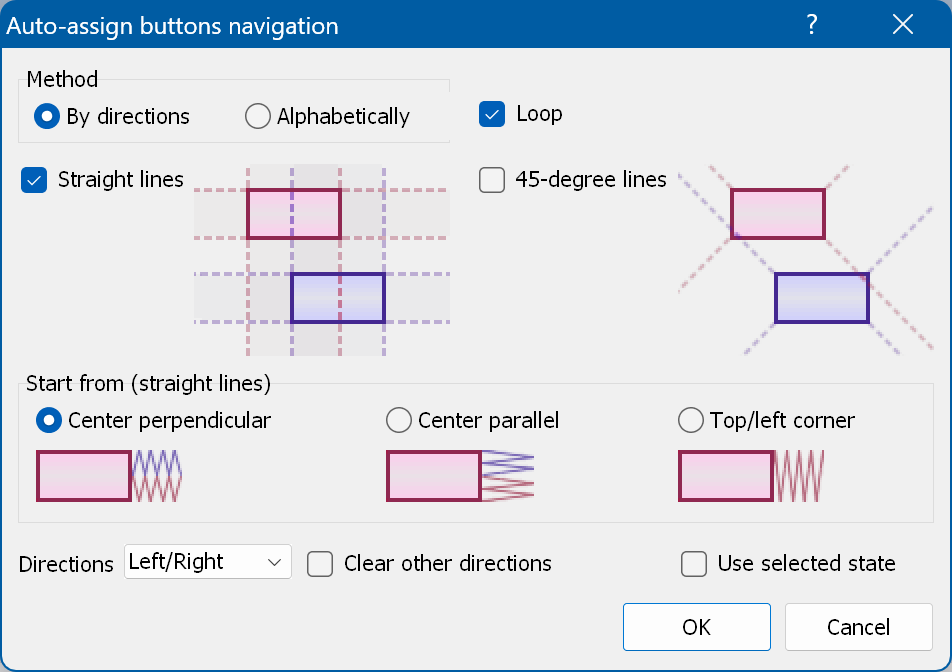
Method - lets you choose between two methods. "By directions" scans from each button in the given directions and assigns the transition to the first button found. "Alphabetically" simply assigns the navigation in alphabetical order (usually from "01" to "02", from "02" to "03"...).
Loop - available if Directions is not set to "All", and for the "Alphabetically" method. Loops from the last button to the first one and vice versa.
Straight lines - search for buttons in the horizontal and vertical directions from each selected button.
45-degree lines - search for buttons along the 45-degree lines from each selected button.
Start from (straight lines) - defines how the algorithm looks for the next button:
Directions - assign All (left/right/up/down) actions, or only the Left/Right or Up/Down ones.
Clear other directions - removes all actions from the directional buttons before the auto-assignment.
Use selected state - use the Selected state instead of the Normal one to search for buttons.