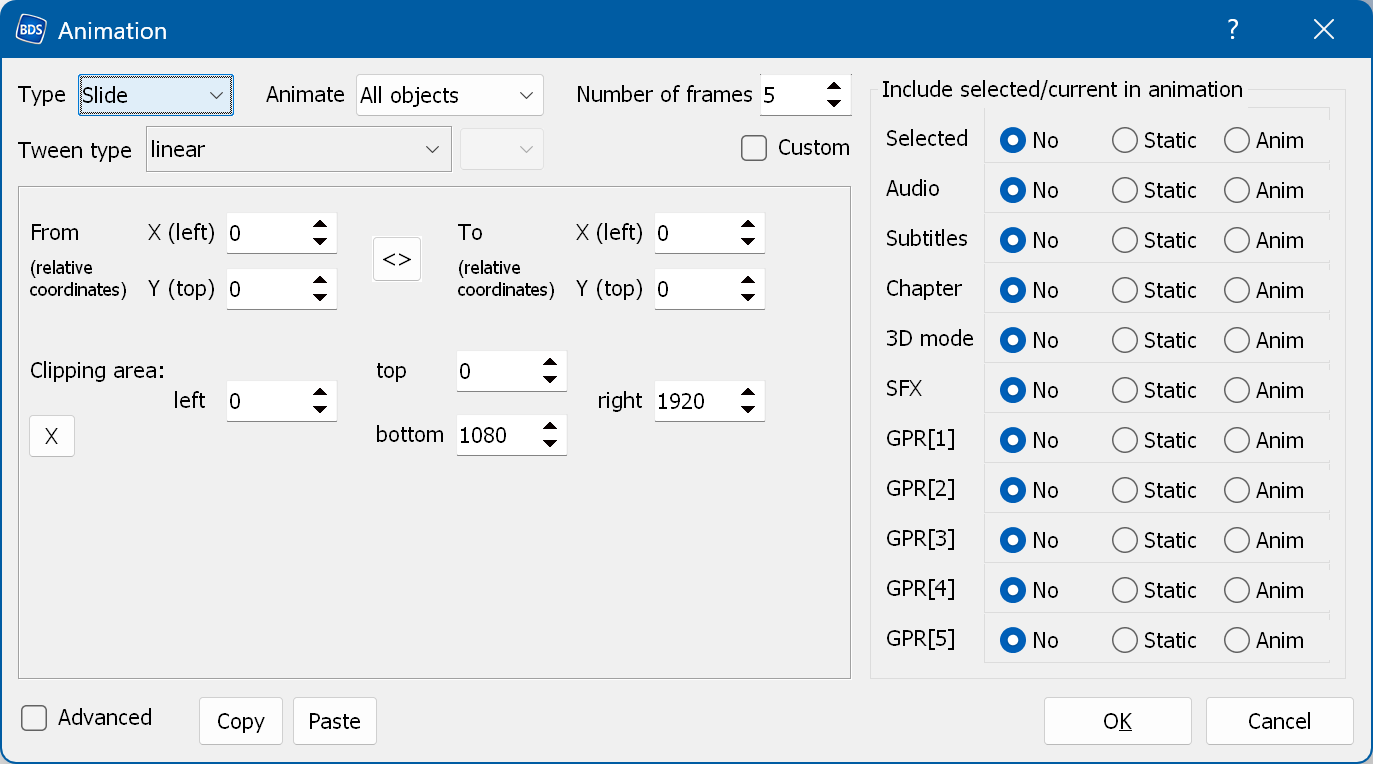
From/To (left/top) - the relative coordinates of the start and the end of the movement. The coordinates (0, 0) mean the current position. Negative numbers mean left and up relative to the current position, positive numbers mean right and down. For example, From delta = (0, -300), To delta = (0, 0) means a slide from the top, starting 300 pixels above the current position.
Note: we recommend increasing the "To" values by one step when you need to move graphics off the screen. For example, if you have to move the graphics 300 pixels within 6 frames to get them off the screen, specify 350 pixels and 7 frames. This avoids animation problems on the Sony PlayStation.
Clipping area - the area the animation is confined to. The default is (0, 0) - (1920, 1080), which means no clipping. Note that the coordinates start at 0, so the actual clipping area of the full screen is (0, 0) - (1919, 1079).
X (the small button in the bottom left corner) - removes the clipping: sets the clipping area to (0, 0) - (1920, 1080), which means no clipping.
Custom - converts the current animation settings into a script-like form and lets you edit them. The animation is defined by lines containing keyframes. The format of each line is as follows:
frame_number x y tween_type
frame_number - the frame number of the animation. The first frame number must be zero.
x and y - relative coordinates.
tween_type - the algorithm used for the transition from the previous keyframe to the current one. See more details here.