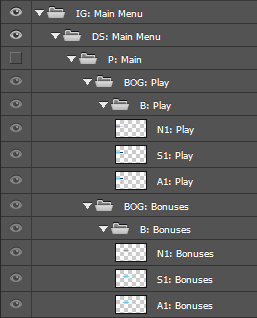
 - the Adobe® Photoshop® Layers window.
 - the Adobe® Photoshop® Layers window.
The names of the buttons and the structure of the files must conform to the specification of Scenarist® Designer PS.
Sections with the prefixes "P" (menu) and "B" (button) are required. All other sections can be omitted, since they are ignored by the application - except for the "BOG" section, which is used if you check "Get button name from BOG".
Button names (B or BOG) must be unique within a menu (P).
I:menu name - this menu is ignored (skipped).
All PSD files must be 32-bit (8 bits per channel).