You can import PSD files in the following formats:
There are several ways to import a PSD file:
Important note: before importing a PSD, rasterize all layers and crop the image:
- Rasterize (before crop): Ctrl+Alt+A → menu Layer → Rasterize → Layers;
- Crop: Ctrl+A → menu Image → Crop.
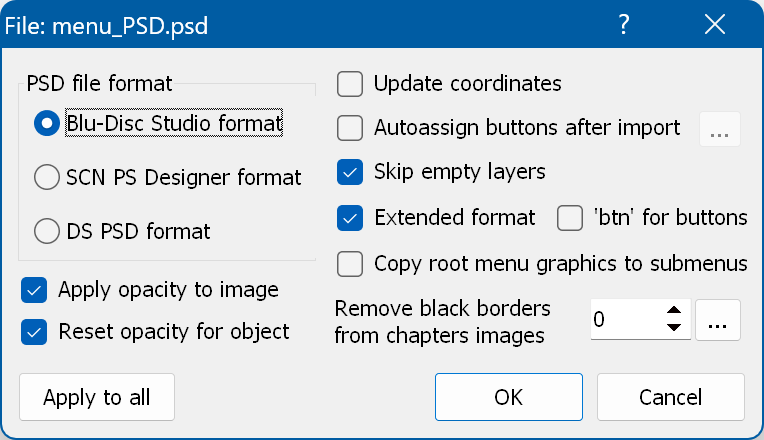
Once you have selected the file, the import settings window appears:
PSD file format - select the format of the file.
Apply opacity to image - in a PSD the opacity is not "merged" with the layer. This option physically applies the opacity to the PNG image ("merges" it with the layer). If it is unchecked, the transparency effect of the object state is used instead.
Reset opacity for object - resets the opacity effect of the object states when an existing menu is updated.
Update coordinates - if a graphic object (button or picture) with the same name already exists in the target menu, you can choose whether to update only the image or the coordinates as well.
Autoassign buttons after import - runs the auto-assign actions once the import has finished.
Skip empty layers - folders in PSD files are empty layers, but sometimes they contain a non-empty image themselves. This check box tells the application to skip such images.
Get button name from B/BOG/BOG + B tag - applies to the Scenarist PS Designer format only. It takes the button names from the "B" (button) tag or from the "BOG" (button group) tag, or combines a name from both.
Extended format - applies to the Blu-Disc Studio format only. It lets you define more than one menu in a PSD file and assign the "Enter" (OK) actions.
Copy root menu graphics to submenus - applies to the extended variant of the Blu-Disc Studio format only. It copies all graphics of the first menu of the PSD to the other menus imported from that PSD, converting all buttons into static images.
Remove black borders from chapters images - applies to the extended variant of the Blu-Disc Studio format only. It removes the black borders when the masks are replaced with the scene images.
Apply to all - applies the settings to all PSD files when you import several files at once.