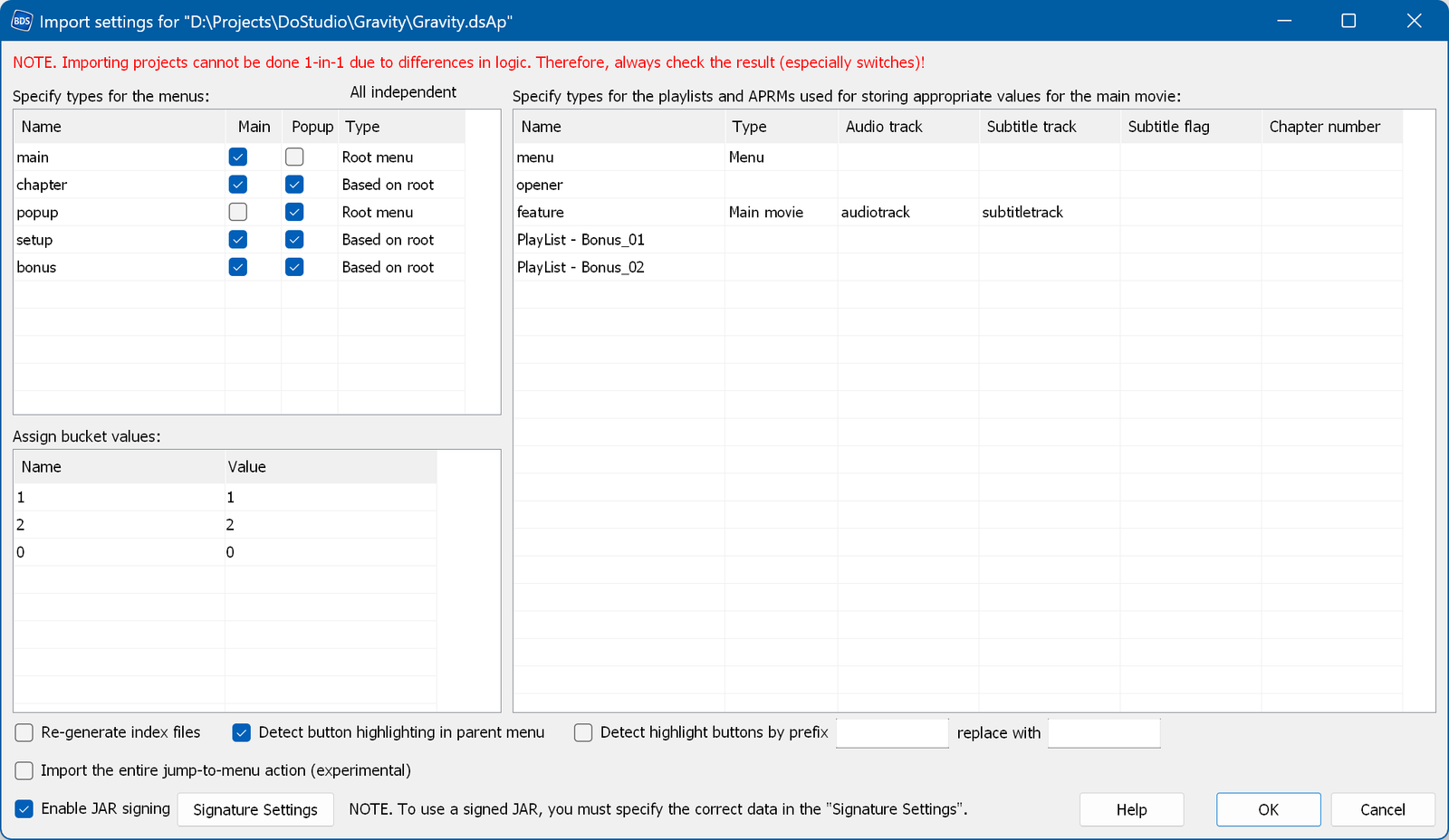
NOTE: projects cannot be imported one-to-one, because the logic of the two applications differs. You should therefore always check the result.
For example, to show a menu in DoStudio you call the "Show Menu Block" command, and you can show two menus at the same time. To hide a menu you call the "Hide Menu Block" command. In Blu-Disc Studio it is impossible to show more than one menu at the same time, and there is no command to show or hide a menu. You can only use "Jump to Menu" or "Play Movie".
Another problem is the intro. In Blu-Disc Studio the intro of a menu has to be a separate video. In DoStudio people often use a single video containing both the menu and the intro. For such cases Blu-Disc Studio uses an intro movie with 0 in the "Additional play items" field.
After you select "Import *.dsAp Indie project" in the menu, the settings window pops up.
In the top left part you specify the types of the menus:
In the bottom left part you assign the bucket values. Blu-Disc Studio does not have buckets, so these values remain plain text. If they are used to compare and/or set the audio or subtitle stream numbers, please enter the corresponding indexes instead of the text names. For example, if you use ON and OFF for the subtitles, assign 1 to ON and 0 to OFF (this is done automatically). If you use STEREO, DD5.1 and COMMENTARY for the audio, please assign the corresponding indexes.
In the right part you specify the playlist settings:
Re-generate index files - check this to force the index files to be regenerated.
Detect button highlighting in parent menu - tries to detect whether the button of the previous menu has to be highlighted in the submenu. If so, the selected state image is copied to the submenu.
Detect highlight buttons by prefix ... - tries to find the buttons used to highlight the current track or chapter by the specified prefix. Such buttons must have the same name as the main buttons, but with the specified prefix, and without any action. These buttons are converted into static images and their Selected or Activated state is transferred to the Current state of the main button. The Replace text is used if the main buttons have a prefix of their own.
Import the entire jump-to-menu action - tries to import the whole jump-to-menu action instead of using a simple "Jump Menu". In DoStudio a jump to a menu contains at least "Start menu playlist" and "Show main menu", which can easily be converted into a regular "Jump menu" action. Sometimes, however, several actions with conditions are used there. You can use this switch to import the entire action, but always check the result!