Menu with Intro
Setting an Intro movie for a menu means that whenever you jump to this menu from a movie or from "First
play", the intro clip is played first, and the menu appears at the second chapter. If you do not specify a
second chapter, the menu appears immediately.
Example:
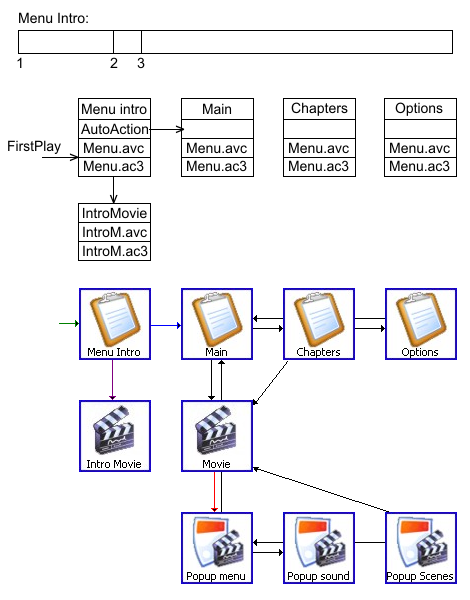 |
- Chapter 1 - the beginning of the movie; this is where we arrive when the menu is started with its
intro.
- Chapter 2 (optional) - the moment the menu appears on the screen.
- Chapter 3 (optional) - the looping point of the menu; this is where we arrive after the end of the menu
playlist is reached, or when the menu is started without its intro. If chapter 3 is not specified, the
start of the menu clip (without the intro) is used.
In this example there are three menus - Main, Chapters and Options - with the
same video/audio streams. We also have a movie called Movie with the popup menus Popup
menu, Popup sound and Popup scenes. Let us assume that we want the intro movie to be
played when the disc starts, but not when we return to the main menu after watching the movie.
We create a movie called Intro Movie and add the audio and video tracks to it. We create a static
copy of the menu Main (by right-clicking it and choosing "Clone tree item as static")
and name it Menu Intro.
In the settings of Menu Intro we set the Intro Movie property (by selecting Intro
Movie in the list) and set the jump to the menu Main in the Enter action property
(Enter action 1: Jump MENU → Main).
Now we set First Play → Menu Intro [anim/act 1].
In the End Action property of the main movie we set the jump directly to the menu
Main.
As a result, when the disc starts playing, the menu appears at chapter 2 of the Intro
Movie. The jump from the End Action of the main movie leads directly to chapter 3 of
Menu Intro (or to the beginning of the main menu clip if chapter 3 is not specified).
|
An intro movie is an additional playitem at the beginning of the menu playlist.
If the menu and the intro are in one file (with no separate menu loop), specify "0" in
"Additional play items" in the "Project properties".
In this case no additional playitems are added to the menu playlist and only the intro playitem (without the menu)
is used for the intro; you then have to specify a loop point (the 3rd chapter) in the intro.
Intro modes
If you do not specify an intro for a menu at all, a single menu playlist is created. The menu video is
repeated in the menu playlist as many times as specified in Project Properties → Menu → Menu playlist
→ Additional playitems. When the end of the menu playlist is reached, it starts playing from the
beginning.
If you specify an intro for a menu (the "Intro Movie" property in the menu properties), two playlists are
created:
- The same as above.
- The same as above, but the first video/audio is replaced with the intro video/audio.
If you use the "Jump to menu" command (from a movie or from "first play") to go to a menu that
has no "Intro Movie" property specified, the first playlist starts playing.
If you use the "Jump to menu" command (from a movie or from "first play") to go to a menu that
has the "Intro Movie" property specified, the second playlist starts playing.
A movie specified in the "Intro Movie" property of a menu is added to the menu playlist
and cannot be used as a regular movie.
Example (9 additional playitems - 10 in total):
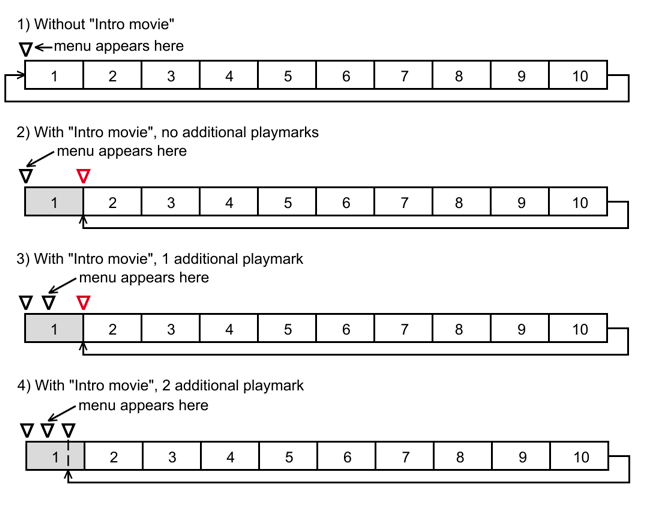
The triangles are chapters. The arrows leaving the end show what happens at the end of the menu playlist. The grey
rectangle is the intro video.
In variants 2 and 3, one additional chapter (shown in red) is added between playitems 1 and 2 during
compilation.