Changing object properties at runtime
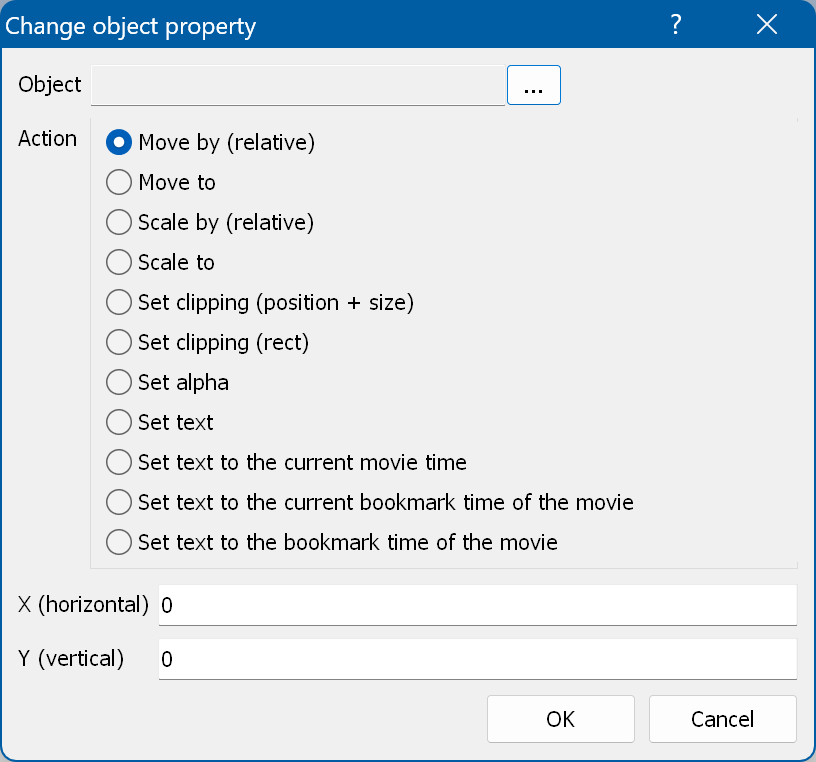
With this action you can change the position, scale, opacity and text of an object state.
Object - the object (image, text, rectangle).
State - the state, for a button object.
Action - the action to execute:
- Move by (relative) - moves the specified object state by the specified offsets (you have to specify a
move container for the object state).
- Move to - moves the specified object state to the specified coordinates (you have to specify a
move container for the object state).
- Scale by (relative) - changes the scale of the specified object state by the specified offsets in mills
(you have to specify a scale effect for the object state).
- Scale to - scales the specified object state to the specified scale in mills (you have to specify a
scale effect for the object state).
- Set clipping (position + size) - changes the clipping (cropping) of the specified object state, given as a
position and a size.
- Set clipping (rect) - changes the clipping (cropping) of the specified object state, given as a
rectangle on the screen.
- Set alpha - changes the opacity of the specified object state (you have to specify an
opacity effect for the object state). Alpha has to be between 0 and 255.
- Set text - changes the first line of the text state of the text object.
- Set text to the current movie time - changes the first line of the text state of the text object to the current
movie/playlist time.
- Set text to the current bookmark time of the movie - changes the first line of the text state of the text object
to the time of the current bookmark of the current movie/playlist.
- Set text to the bookmark time of the movie - changes the first line of the text state of the text object to the
time of the specified bookmark of the current movie/playlist.
You can use arithmetic operations in the numeric fields of the move, scale, clip, and alpha actions.
There are special keywords that can be used in the numeric and text fields:
- %time% - the current time of the playlist (movie);
- %duration% - the duration of the current playlist (movie);
- %time-movie name% - the resume time of the specified movie;
- %cbm-movie name% - the time of the current bookmark of the specified movie (the bookmark selected with
these commands).
In numeric fields these keywords return the time in seconds and can be used in formulas. In a text field
they return the time in the form 01:23:45 and have to be the only text in the field.