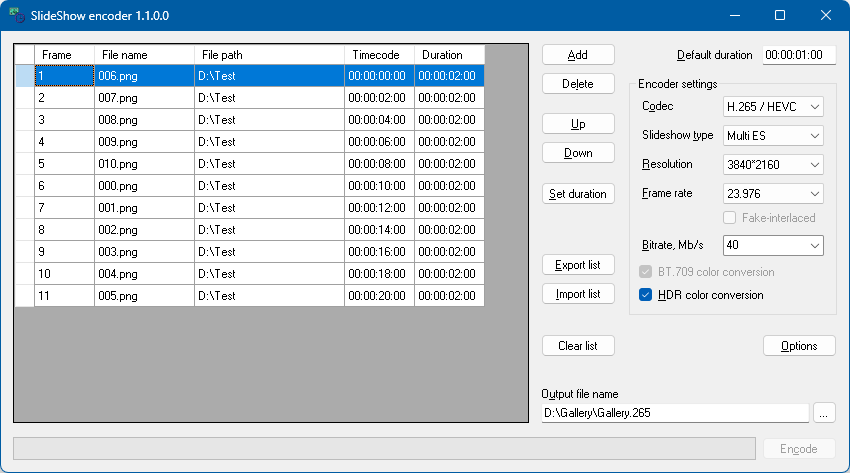
The slideshow encoder is designed to create slideshows from images. It needs the x264 encoder to encode H.264 slideshows and the x265 encoder to encode H.265 (UHD) ones. We recommend the x264 versions from videolan.org and the x265 versions from builds.x265.eu. You can either place x264.exe and x265.exe in the application folder or specify their paths in the application options.
Add - adds an image to the list. You can also drag and drop images. To change a file, double-click it.
Delete - removes the image from the list.
Up/Down - moves the selected image up/down in the list.
Set duration - lets you set the duration of the selected image(s). The duration must not be shorter than half a second.
Export/Import list - lets you save and restore the file list in the XML or SPL format.
Clear list - clears the file list.
Options - the paths to the x264 and x265 encoders (required to encode a slideshow), the AVC Corrector switch (not recommended, but it may be needed if the output is used in third-party applications; it applies to H.264 only, and not to regular movies) and the HDR color conversion settings.
Default duration - lets you specify the default duration of the files you add.
Encoder settings - here you can specify the codec, the type of the slideshow, the frame rate, the bitrate, the encoder preset, the target resolution, the fake-interlaced flag (used for 29.97 and 25 fps only) and the color conversion.
Encode - encodes the list into the output file. The window stays usable while encoding: the list and the settings are locked, the progress bar shows how far the encoding has got, and the button turns into Cancel, which stops the encoding and removes the files written so far. Closing the window while encoding asks whether to stop it.
H.264/AVC is the codec for Blu-ray, H.265/HEVC the one for UHD Blu-ray. H.265 slideshows are encoded with x265 as 10-bit Main10, UHD Blu-ray compliant streams.
The codec and the output file name are kept in step: selecting a codec changes the extension of the output file (.264 / .265), and an output file named .265 or .hevc selects H.265.
What the codec changes:
The settings the two codecs do not share are remembered separately, so switching over and back does not discard what was chosen for the other one.
A regular movie shows every image for its duration, like Movie (I-frames), but only the first frame of each image and then one frame a second are complete pictures. The frames in between repeat the image at almost no cost, so a regular movie is many times smaller than a Movie (I-frames) one and can be encoded in H.265 as well. Every image starts on a key frame, so a chapter can start on any image. No .spi file is written, and the result is used like any other video clip; an .spi file left next to the output file by an earlier slideshow is deleted, as BDMD would otherwise take the movie for a slideshow.
A regular movie always uses the BT.709 color conversion, is never passed through the AVC Corrector, and has to be at least 2 frames long in H.265. It is exported to SPL as Movie, since Scenarist has no such type.
The encoder preset trades speed for compression: superfast, veryfast, faster, fast, medium, slow, slower and veryslow, the default. A slower preset gives better quality at the same bitrate, at the cost of encoding time. Ultrafast is not offered, because x264 then writes a stream Blu-ray does not accept.
The preset matters mainly for H.265 at 3840*2160, and most for regular movies, where every frame is encoded: there x265 is about four times faster with medium than with veryslow. x264 at 1920*1080 is fast with any preset.
BT.709 color conversion - x264 converts RGB to YUV with BT.601 coefficients whatever the stream is tagged with, so the picture and the BT.709 tag do not agree. With this option the images are converted and scaled to the target resolution by the program itself and the encoder is handed a ready-made picture. x265 reads no image formats at all, so H.265 always uses this conversion and the flag cannot be unchecked. Regular movies always use it too, as x264 cannot read a list of images with their durations.
HDR color conversion (H.265 only) - converts the images from SDR to HDR (BT.2020 PQ) and writes the HDR10 metadata into every slide. It is the same conversion BDMD applies to its HDR menus, so that a slideshow matches the menus around it. The settings are in Options:
Method - the algorithm used for the conversion. Adjusted usually gives the best result. "Vivid+Adjusted" is the equivalent of "Vivid" in the IG Editor. "Cube file" lets you use a color LUT file for the conversion.
In/Out exponent - the In (Adjusted and Classic) and Out (Adjusted, Vivid+Adjusted) parameters of the conversion. Increasing "In" makes the output darker.
Cube file - the .cube file (3D LUT) used by the "Cube file" method.
Mastering display - the mastering display written into the stream. Select one of the presets, or "Custom" to type your own as G(x,y)B(x,y)R(x,y)WP(x,y)L(max,min): the chromaticities in units of 0.00002, up to 50000, the luminances in units of 0.0001 cd/m2, up to 100000000, and the minimum below the maximum.
MaxCLL/MaxFALL - the maximum content light level and the maximum frame-average light level, in cd/m2.