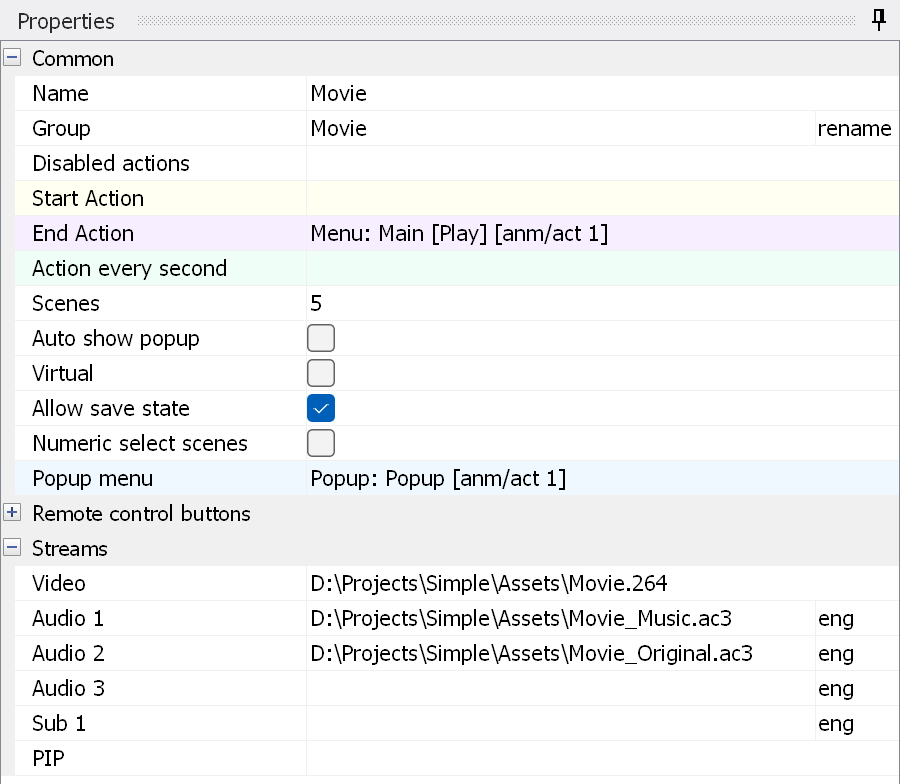
Name - the name of the movie.
Group - the name of the group. Double-click "rename" to rename the group.
Disabled actions - opens a list of the actions that you can disable for this movie. Note that disabling "Call Top Menu" only works if you have a single JAR, and only for the First Play movies (the movies started by First Play and by their End actions). These movies have to be started with the ordinary "Play MOVIE" command (without Resume). All such movies must have the "Call Top Menu" action disabled; they are moved outside the JAR during compilation and are played before the JAR is loaded.
Start Action - the action executed when the movie starts. Please do NOT add "Play Movie/Playlist" commands here. Note that on some players the chapter number may be unavailable (wrong or equal to 0) in this action.
End Action - the action executed when the movie ends (i.e. where to go after the movie has finished playing).
Action every second - an action executed every second. It can be used, for example, to update the subtitle selection according to the selected audio track.
Scenes - the number of chapters in the movie. Double-click it to open the scene creation window.
Auto show popup - shows the popup automatically after the movie has started. This only works if you jump to this movie from the main menu.
Numeric select scenes - turns on a special mode for the numeric keys of the remote control. In this mode, pressing the numeric keys selects a chapter. It is used in BD-Audio. If you press "1" and "2" within 2 seconds, chapter 12 is selected.
Virtual - if this is checked, the movie becomes a virtual one. Virtual movies are intended for playlists; such a movie cannot be selected in the Play MOVIE command.
Allow save state - the same as for a menu.
Popup Menu - select the main popup menu of the movie (the menu that appears on the TV screen when you press the Popup button on the remote control).
Here you can assign actions to the various remote control buttons. Note that using the Play/Pause/Stop/Next track/Prev track/Fast forward/Rewind buttons switches the main title to interactive mode.
Streams
The video, dependent video (used for 3D), audio and subtitle tracks used in the movie. To move a track up/down, change the audio delay or disable a track, right-click the name of the track. You can use 5.1 wave files (WAV or W64) with the channel order L, R, C, LFE, Ls, Rs. Note: see also how to specify multiple-file streams.
PIP - select this line and click the button that appears on the right. This opens the PIP settings window.