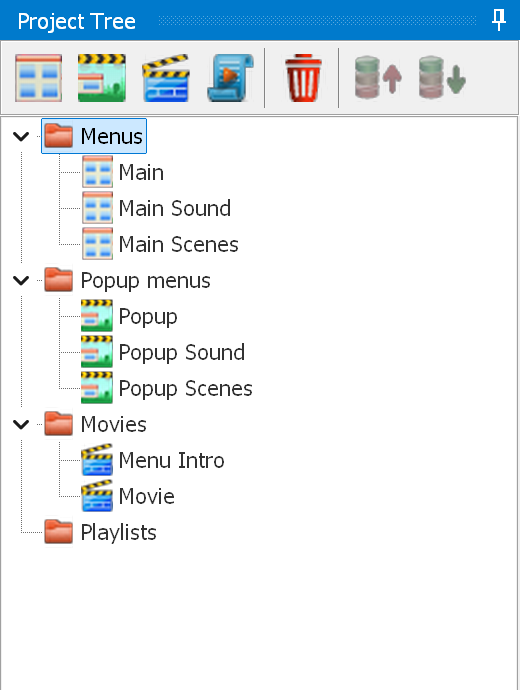
The project tree displays all existing menus, movies and playlists of the project:
 - create a new menu
 - create a new popup menu
 - create a new movie
 - create a new playlist
 - delete the selected object
 -
move the selected item up or down within the project tree
-
move the selected item up or down within the project tree
Right-clicking a menu, movie or playlist opens a context menu:

Find contains:
Batch operations - lets you apply certain actions to the selected menus.
Color - marks the selected tree item(s) with one of eight background colors, which are set in the program options. Reset removes the mark.
Copy properties to all - copies the properties of the current menu, popup, movie or playlist to all menus (popups/movies/playlists).
Copy name(s) - copies the name(s) of the tree item(s) to the clipboard. Simple - just the name. For Java - converted to the internal representation.
Clone tree item - duplicates the selected item of the project tree (menu, popup menu, movie or playlist).
Clone tree item as static [menus and popup menus only] - duplicates the selected item of the project tree, replacing all buttons with images (a static menu is a menu without any buttons). Static menus are commonly used to create transitions between menus by means of enter animations and enter actions.
Clone between main / popup - copies a main menu into a popup, or vice versa.
Clone all between main / popup - copies all main menus into popups, or vice versa.
Copy positions between main / popup - moves the objects of the popup with the same name as the selected main menu (or vice versa) to the positions of the objects with the same names, ignoring case. Objects with no counterpart stay where they are. If several menus are selected, all of them are processed.
Import PSD [menus and popup menus only] - imports a PSD into the current section of the tree (Menu or Popup).
Generate carousel [menus and popup menus only] - creates a carousel menu.
Create playlist [movies only] - lets you create a playlist from one or more movies:
Open scenes [movies and playlists only] - opens the scene creation window in standard mode. In this mode you can delete all scenes and create them again: the links to the chapters (the "Play Movie → Chapter ..." commands) are restored when the scene creation window is closed.
Open scenes (direct editing) [movies and playlists only] - opens the scene creation window in direct editing mode, in which deleting a chapter also removes the corresponding "Play movie → Chapter ..." command.
Generate scenes [movies and playlists only] - opens the generate chapters window and creates the chapters without opening the scene creation window. The chapters are edited as in direct editing mode: if "Remove existing" is checked, the existing chapters are deleted together with the corresponding "Play movie → Chapter ..." commands. If some of these chapters have actions, you are asked to confirm first. A new chapter is not added where a chapter already exists. The search for black screens can be cancelled in the progress window. If several movies or playlists are selected, the window is shown once and its settings are used for each of them. There is no From...To interval then: each movie or playlist gets its chapters over its whole length. Movies that are too short for the selected number of chapters are skipped and listed at the end. Cancelling the search for black screens also stops the movies that have not been processed yet.
Partial mux - lets you re-mux the selected movie/playlist or the whole main menu (including the intros). It applies to the internal muxer and tsMuxeR only.
Move Up/Down - moves the selected item up or down within the project tree.
New Menu / Popup menu / Movie / Playlist - creates the corresponding project tree item.
Delete - deletes the selected item of the project tree.