How to create scenes (chapters)
Scene creation window
To open the scene creation window, double-click the movie or playlist, or select the Scenes row in the
properties of the movie and click the button on the right, or right-click the
movie/playlist and select the editing mode you want:

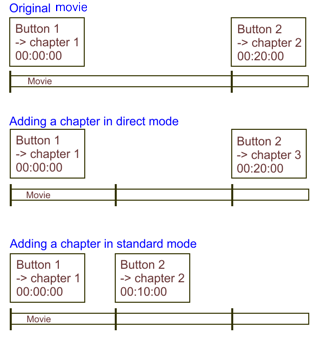
- Open scenes - opens the scene creation window in standard mode. In this mode you can delete all scenes and
create them again: the links to the chapters (the "Play Movie → Chapter ..." commands) are restored
when the scene creation window is closed. This is the default mode, used when you double-click a movie/playlist
or open the scenes with the button in the "Scenes" property (see below).
- Open scenes (direct editing) - opens the scene creation window in direct editing mode, in which deleting a
chapter also removes the corresponding "Play movie → Chapter ..." command. In this mode you can
also add actions to the chapters (see below).
The difference between the standard and the direct mode when a chapter is added:
If the movie has not been indexed yet, the indexing starts; which indexer is used depends on the target selected
in the target list (Internal muxer, Export, tsMuxeR).
Related topics: